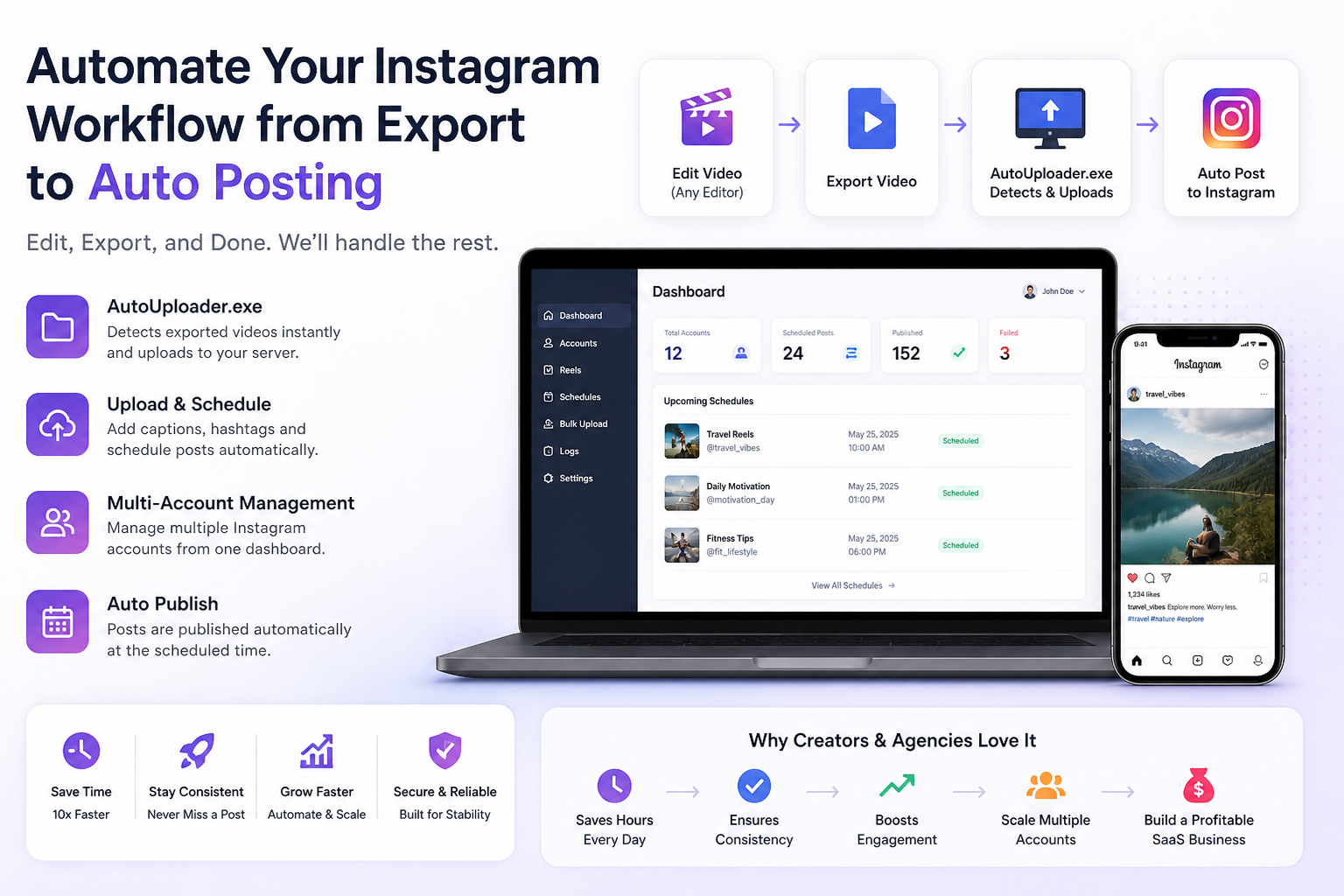
Instagram Automation – A Better Way to Manage Your Content
Introduction
Managing Instagram content manually can become exhausting very quickly. If you are a creator or running a page, you already know how repetitive the process is. Every single post requires the same steps — exporting the video, opening a dashboard, uploading it, writing captions, adding hashtags, and finally scheduling or posting it.
After doing this again and again, it starts taking more time than it should. More importantly, it affects consistency, which is one of the most important factors for growing on Instagram.
That is exactly why I built this platform.
This Instagram Automation system is designed to remove all the repetitive work from your workflow. It helps you manage uploads, scheduling, and publishing in a way that feels natural and effortless. The goal is simple — you focus on creating content, and the system handles everything else in the background.
See It in Action
Instead of explaining everything, here’s a quick demo showing how the system works in real workflow. Watch how a video gets detected right after export and automatically uploaded without any manual steps.
From export to upload — fully automated workflow
What This Platform Actually Does
When I started working on this, I did not want to create just another upload tool. There are already many tools that let you upload or schedule posts. The real problem is the workflow itself.
This platform is built as a complete system that connects all parts of content creation and publishing.
It allows you to:
1. Manage multiple Instagram accounts from one place
2. Upload and schedule reels automatically
3. Handle large amounts of content without slowing down
4. Publish content without manually logging in every time
5. Run it as a subscription-based system if you want to build a business
Everything is connected in a way that reduces manual effort and keeps your content flow consistent.
AutoUploader.exe – The Part That Changes Everything
The biggest problem I wanted to solve was the gap between editing and uploading.
Normally, after editing a video, you still have to go through the entire upload process manually. That is where most of the time is lost.
So I built AutoUploader.exe.
This is a small desktop tool that runs in the background and watches your export folder. The moment you export a video, it detects the file automatically and sends it to your server.
You do not need to open any dashboard or upload anything manually.
Here is how it works in a simple way:
1. You edit your video in any software you like
2. You export the final file
3. The tool detects the new file instantly
4. It uploads it to your system
5. The platform takes over from there — scheduling or publishing it
There is no extra step in between. It just fits into your existing workflow.
How the Workflow Changes
If you think about how things are usually done, the process looks something like this:
You export a video, open your browser, log in, upload the file, add captions, and then schedule it. This happens for every single post.
1. It might not seem like much at first, but over time, it adds up to hours of repetitive work.
2. With this system, the workflow becomes much simpler.
3. You just export the video, and everything else is handled automatically.
This small change makes a big difference. It saves time, reduces friction, and helps you stay consistent without putting in extra effort.
Managing Multiple Accounts Without Stress
If you are handling more than one Instagram account, things can get complicated very quickly. Switching between accounts, keeping track of content, and scheduling everything separately becomes difficult to manage.
That is why I built the platform to support multiple accounts from the start.
You can connect multiple Instagram accounts and manage everything from a single dashboard. Each account can have its own content, its own schedule, and its own workflow.
You also get:
1. Clear visibility of all connected accounts
2, Separate scheduling for each account
3. Protection against duplicate connections
4. Status tracking so you know which accounts are active
This makes it much easier to scale, whether you are managing your own pages or working with clients.
Scheduling That Actually Works for You
Consistency is one of the hardest things to maintain manually. Even if you have content ready, posting it at the right time every day becomes a challenge.
You can:
1. Schedule posts for specific dates and times
2. Set recurring schedules (daily, weekly, monthly)
4. Automatically retry failed posts
5. Track what is scheduled and what has been published
Once your content is scheduled, you do not need to worry about it again.
Handling Bulk Content Easily
If you are working with a lot of content, uploading one video at a time is not practical. It slows you down and makes the process harder than it needs to be.
This platform allows you to upload multiple reels at once. The system processes everything in the background, so you do not have to wait or manage each file manually.
You can:
1. Upload multiple videos in one go
2. Let the system process them in the background
3. Track which uploads succeeded and which failed
4. Keep everything organized without extra effort
This is especially useful for agencies or creators who work with high volumes of content.
Automatic Publishing Without Manual Steps
One of the main goals of this platform is to remove the need for manual posting completely.
Once your content is uploaded and scheduled, the system takes care of publishing it. It uses proper API integration to ensure that everything is handled correctly and reliably.
You do not need to log in every day or manually post content.
The system:
1. Uploads your video
2. Processes it
3. Publishes it at the scheduled time
All of this happens in the background.
Turning This Into a Business
While building this, I also wanted to make sure it could be used as a business.
That is why the platform includes a built-in subscription system. You can charge users based on the number of accounts they connect and manage everything through the system.
It includes:
1. Subscription-based pricing per account
2. Payment integration
3. Tracking of payments and plans
4. Control over access based on subscription status
This allows you to turn the platform into a scalable SaaS product if you want to.
Keeping Everything Stable and Reliable
When you automate something important like content publishing, reliability becomes critical.
That is why the system includes proper logging and background processing.
You can monitor everything that is happening:
1. Upload activity
2. API responses
3. Errors and failures
4. Scheduled tasks
There is also a background system that keeps everything running even when you are not actively using the platform.
Who This Is Built For
I designed this platform keeping real users in mind.
It works well for:
1. Content creators who want to save time
2. Page owners managing multiple accounts
3. Agencies handling client content
4. Anyone trying to build a system around Instagram growth
If your workflow involves creating and posting content regularly, this system will make a noticeable difference.
What You Actually Gain
At the end of the day, this is not just about automation. It is about making your workflow simpler and more efficient.
With this system, you:
1. Save hours of repetitive work
2. Stay consistent without extra effort
3. Reduce manual mistakes
4. Focus more on content creation
5.Have the option to build a business around it
Final Thought
Your role should be to create content and grow your ideas.
The system should take care of everything else.
Try It Yourself
If you want to experience how this works in real usage, you can try it yourself.
Once you start using it, the difference in workflow becomes very clear.
Let your content upload, schedule, and publish itself — while you focus on growth.